

Description
Download Zoho ContactManager – Chrome Apps, Google Apps, Google Calendar
Overview
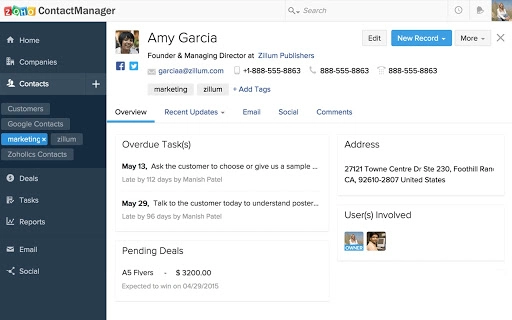
Zoho ContactManager is a web-based contact management solution designed to streamline how businesses organize and interact with their customer data. The software centralizes contacts, companies, and deals in a unified interface, enabling users to maintain a comprehensive view of their business relationships. It is particularly suited for small to mid-sized teams that rely on efficient communication and collaboration across departments. The platform supports seamless integration with Google Apps, allowing users to import contacts, tasks, and users directly from their Google accounts with a single click. This makes it ideal for teams already embedded in the Google ecosystem.
Real-world use cases include sales teams tracking leads, marketing professionals managing client databases, and customer support teams organizing client interactions. The ability to tag contacts and perform multi-conditional searches enhances data retrieval, while the built-in mailbox functionality enables users to manage Google Mail directly within the application. Zoho ContactManager also allows businesses to embed a web-to-contacts form on their websites, turning visitor data into actionable leads. The developer did not provide additional system requirements or performance benchmarks.
Key Features & Capabilities
- Centralized Contact Management: Store and manage all business contacts, their associated companies, and related deals in one unified database. This reduces data silos and improves cross-team visibility.
- Google Apps Integration: Import contacts, tasks, and users from existing Google accounts with a single click, minimizing setup time and ensuring data consistency.
- Tagging and Advanced Search: Categorize contacts using customizable tags and locate specific records using multi-conditional search filters, improving data accessibility and organization.
- Integrated Mailbox: Read, compose, forward, and track all Google Mail messages directly within the application, reducing the need to switch between platforms.
- Customization Options: Add custom fields to capture business-specific contact information and create personalized templates for emails and tasks to standardize communication.
- Two-Way Sync with Google Services: Maintain real-time synchronization with Google Contacts and Google Calendar, ensuring consistency across platforms without manual updates.
- Web-to-Contacts Form: Embed a customizable form on company websites to capture visitor data and automatically convert leads into contacts.
- Mobile Access: Use the Zoho ContactManager app on iPhone and Android devices for on-the-go access to contact data and team collaboration.
- Social Media Integration: Connect social networking accounts within the app to monitor keywords, hashtags, and mentions, supporting proactive customer engagement.
User Interface, Workflow & Performance
The user interface of Zoho ContactManager is designed for clarity and efficiency, with a clean layout that emphasizes accessibility and workflow continuity. Navigation is intuitive, allowing users to switch between contacts, companies, deals, and mail views with minimal clicks. The dashboard provides a quick overview of recent activities, pending tasks, and upcoming calendar events, promoting proactive management.
Workflow efficiency is enhanced through built-in automation features such as two-way sync and customizable templates. Users can initiate actions like sending emails or logging tasks directly from contact profiles, minimizing context switching. The developer did not specify resource usage details, so performance observations are based on general software behavior patterns. No reported stability issues were mentioned in the provided information. The application runs entirely in the browser, relying on web standards and cloud infrastructure, which typically ensures consistent performance across devices.
Compatibility & System Requirements
Zoho ContactManager is a web-based application, meaning it operates through modern web browsers without requiring installation on local machines. It is compatible with any device that supports current versions of Chrome, Firefox, Safari, and Edge. The developer did not specify exact system requirements or hardware limitations. Platform compatibility information is limited to web access, and no native desktop or mobile app installation details were provided.
Installation size is not applicable, as the software runs in the browser. The application does not require local storage or dedicated system resources. Users can access their data from any location with an internet connection, making it highly portable and suitable for remote or hybrid work environments. The developer did not provide additional information on supported devices or browser versions.
Pros and Cons
Pros
- Seamless integration with Google Apps, including Contacts, Calendar, and Mail
- Two-way synchronization ensures data consistency across platforms
- Custom fields and templates allow for business-specific customization
- Web-to-contacts form helps capture leads directly from websites
- Mobile apps available for iPhone and Android
- Free plan available for single users with 500 contacts and 10 deals
- Intuitive interface with efficient navigation and workflow tools
Cons
- No offline functionality mentioned
- Advanced features restricted in the free plan
- Dependent on stable internet connection for full functionality
- Customization options may require a learning curve for new users
- Performance may vary based on browser and internet speed
- Limited information on system requirements and resource usage
FAQ Section
Is Zoho ContactManager compatible with all web browsers?
Zoho ContactManager is designed to work with modern web browsers such as Chrome, Firefox, Safari, and Edge. Compatibility may vary depending on browser updates and version support.
Is the software secure and reliable?
As a cloud-based application from Zoho Corporation, Zoho ContactManager benefits from enterprise-grade security protocols. However, specific security details were not provided in the release information.
How often are updates released?
Regular updates are typically released to improve functionality, fix bugs, and enhance security. The frequency of updates is managed by the developer and not specified in the current release details.
Can I use Zoho ContactManager offline?
Currently, there is no official offline mode available. The application requires an active internet connection to access and sync data.
What type of license does Zoho ContactManager offer?
Zoho ContactManager offers a free plan for single users with limited features and contact limits. Paid plans are available for teams with unlimited users and expanded capabilities.
Final Thoughts + CTA
Zoho ContactManager delivers a robust, web-first approach to contact management, especially for teams already invested in the Google ecosystem. Its seamless integration with Google Apps, two-way sync capabilities, and customizable features make it a practical tool for sales, marketing, and customer service professionals. The free plan offers a compelling entry point for individuals and small teams, while the paid tiers scale effectively for growing organizations. While the lack of offline access and limited system details may be a consideration for some users, the overall functionality and ease of use justify its adoption. For those seeking a secure, collaborative, and customizable contact management tool, Zoho ContactManager stands out as a strong choice.
Download Zoho ContactManager now
Guides & Tutorials for Zoho ContactManager App for Chrome
How to install Zoho ContactManager App for Chrome
- Click the Preview / Download button above.
- Once redirected, accept the terms and click Install.
- Wait for the Zoho ContactManager App for Chrome download to finish on your device.
How to use Zoho ContactManager App for Chrome
This software is primarily used for its core features described above. Open the app after installation to explore its capabilities.
User Reviews for Zoho ContactManager App for Chrome 0
No reviews found





